Pages

Wednesday, 1 January 2014

How to make your pendrive bootable using Command Prompt

Hello friends, in this post, i will show you how to make your pendrive bootable to install Windows Vista/7 and 8 using only Command Prompt. Follow the tsep by step tutorial below:

1. Insert your USB (4GB+ preferable) stick to the system and backup all the data from the USB as we are going to format the USB to make it bootable.

2. Open elevated Command Prompt. To do this, type in CMD in Start menu search field and hit Ctrl + Shift + Enter. Alternatively, navigate to Start > All programs >Accessories > right click on Command Prompt and select run as administrator.

3. When the Command Prompt opens, enter the following commands:


DISKPART and hit enter.

LIST DISK and hit enter.

Once you enter the LIST DISK command, it will show the disk number of your USB drive. In the below image my USB drive disk no is Disk 1.

4. In this step you need to enter all the below commands one by one and hit enter. As these commands are self explanatory, you can easily guess what these commands do.

SELECT DISK 1 (Replace DISK 1 with your disk number)

CLEAN

CREATE PARTITION PRIMARY

SELECT PARTITION 1

ACTIVE

FORMAT FS=NTFS

(Format process may take few seconds)

ASSIGN

EXIT


Once it is done, copy the windows DVD contents to the pendrive.


You are done with your bootable USB. You can now use this bootable USB as bootable DVD on any computer that comes with USB boot feature (most of the current motherboards support this feature).

Note: This bootable USB guide will not work if you are trying to make a bootable USB on XP computer.

A short Description on Animation

Animation is a graphic representation of drawings to show movement within those drawings.  A series of drawings are linked together and usually photographed by a camera.  The drawings have been slightly changed between individualized frames so when they are played back in rapid succession (24 frames per second) there appears to be seamless movement within the drawings.
Extinct dinosaur?Pioneers of animation include Winsor McCay of the United States and Emile Cohl and Georges Melies of France.  Some consider McCay's Sinking of the Lusitania from 1918 as the first animated feature film.
     Early animations, which started appearing before 1910, consisted of simple drawings photographed one at a time.  It was extremely labor intensive as there were literally hundreds of drawings per minute of film.  The development of celluloid around 1913 quickly made animation easier to manage.  Instead of numerous drawings, the animator now could make a complex background and/or foreground and sandwich moving characters in between several other pieces of celluloid, which is transparent except for where drawings are painted on it.  This made it unnecessary to repeatedly draw the background as it remained static and only the characters moved.  It also created an illusion of depth, especially if foreground elements were placed in the frames.
Night time sky     Walt Disney took animation to a new level.  He was the first animator to add sound to his movie cartoons with the premiere of Steamboat Willie in 1928.  In 1937, he produced the first full length animated feature film, Snow White and the Seven Dwarfs.
     With the introduction of computers, animation took on a whole new meaning.  Many feature films of today had animation incorporated into them for special effects.  A film like Star Warsby George Lucas would rely heavily on computer animation for many of its special effects.  Toy Story, produced by Walt Disney Productions and Pixar Animation Studios, became the first full length feature film animated entirely on computers when it was released in 1995.
     With the advent of personal computers, it has now become possible for the average person to create animations.
Bibliography
Finch, Christopher. The Art of Walt Disney, 1973.
Laybourne, Kit.  The Animation Book, 1998.
Locke, Lafe.  Film Animation Techniques, 1992
Manvell, Roger. Grolier Multimedia Encyclopedia, 1998.
Mosley, Leonard. Disney's World, 1985.

Download Bat to Exe Converter


Bat To Exe-Converter is a tool that lets you convert bat script files that you write on notepad to exe files. There are some differences to normal bat files. You can create invisible applications, you can include additional binaries, icons and version informations to your program.

Download Bat to exe-converter by clicking here.

Monday, 23 December 2013

Activate Windows 8.1 without internet connection.

Activate Windows 8.1 without internet connection.

Want to activate windows 8.1 to activate all its features. Use Microsoft toolkit 2.4.9 to activate it. You can use this toll to activate any version of windows from Windows Vista & also Microsoft Office 2007 onwards. This tool is very useful for this purpose as it is very light weight and virus free.


You can download this app from here.
Download Microsoft Toolkit 2.4.9

Requirements:

  • Microsoft Dot Net Framework 4.0 or 4.5 (not 3.5)
  • Microsoft Office 2010 or later (for office toolkit).
  • Microsoft Windows Vista or later (for windows toolkit)

Changes in version 2.4.9

  • Activation won't crash if attempting to activate KMS V6 clients (which currently can't be activated).
  • EZ-Activator will attempt to install Windows Embedded Volume Keys (such as Windows Thin PC).
  • License Backup and Restore supported for Windows 8.1 and Windows Server 2012 R2.
  • Updated functionality and inclusion of Windows 8.1 and Windows Server 2012 R2 RTM Keys.
I 

Saturday, 30 November 2013

HOW TO LOCK A FOLDER WITH YOUR PASSWORD

HOW TO LOCK A FOLDER WITH YOUR PASSWORD


Just follow the below steps:

Step 1:- Open the Notepad.exe
Step 2:- Copy the following code into the notepad.
Quote: cls
@ECHO OFF
title Folder Private
if EXIST "Control Panel.{21EC2020-3AEA-1069-A2DD-08002B30309D}" goto UNLOCK
if NOT EXIST Private goto MDENTER PASSWORD TO OPEN
:CONFIRM
echo -----------------------------------------------------------
echo ================== Www.indiatrix.blogspot.in ==================
echo -----------------------------------------------------------
echo Are you sure you want to lock the folder(Y/N)
echo Press (Y) for Yes and Press (N) for No.
echo -----------------------------------------------------------
set/p "cho=>"
if %cho%==Y goto LOCK
if %cho%==y goto LOCK
if %cho%==n goto END
if %cho%==N goto END
echo Invalid choice.
goto CONFIRM
:LOCK
ren Private "Control Panel.{21EC2020-3AEA-1069-A2DD-08002B30309D}"
attrib +h +s "Control Panel.{21EC2020-3AEA-1069-A2DD-08002B30309D}"
echo Folder locked
goto End
:UNLOCK
echo -----------------------------------------------------------
echo ================== www.indiatrix.blogspot.in ==================
echo -----------------------------------------------------------
echo Enter password to unlock folder
set/p "pass=>"
if NOT %pass%== YOUR PASSWORD goto FAIL
attrib -h -s "Control Panel.{21EC2020-3AEA-1069-A2DD-08002B30309D}"
ren "Control Panel.{21EC2020-3AEA-1069-A2DD-08002B30309D}" Private
echo Folder Unlocked successfully
goto End
:FAIL
echo Invalid password
goto end
:MDENTER PASSWORD TO OPEN
md Private
echo Private created successfully
goto End
:End
Step 3:- Now change the password in the if NOT %pass%==YOUR PASSWORDgoto FAIL line replace text of Your
Password with your password for the folder lock.
Step 4:- Now save this file as locker.bat and you are done.
Step 5:- Now Open the Locker.bat file and enter your password to open a private folder of yours.
Step 6:- Now copy paste the files which you want to hide and make it secure in the private folder.
Step 7:- Now again open the Locker.bat file and press 'Y' to lock the private folder with your password.
Step 8:- Now to again open the secured files open the locker.bat file Enter your password and your files are there for you.
NOTE: “You can use Bat to exe converter and can convert it into .exe file to safeguard the code above.”

Thursday, 28 November 2013

Get more Facebook likes,share; Twitter followers; Website Traffic and much more....

Want to get more Facebook likes, shares & followers ?
Want more Twitter followers ?
Want more Google's +1, Stumbleupon followers, Soundcloud followers, YouTube likes, YouTube views and more traffic to your site ????
Then create a account in FanHolic & get started to get all these.

FanHolic Logo


FanHolic's exchange system allows you to pick and choose who you want to follow, like, view and skip those who you are not interested in. The exchange system is very simple.Every time you like, follow or view another members social media pages, you will receive coins which then you can use to get more followers, likes, views or visitors to your website or social media pages.

So, why you are waiting for ?
Just head to their website and start getting more likes, followers and much more.

If you have any more questions in your mind then go here to learn more about FanHolic.


FanHolic - Get free Facebook page likes, Facebook followers, Facebook Shares, YouTube Hits and much more!

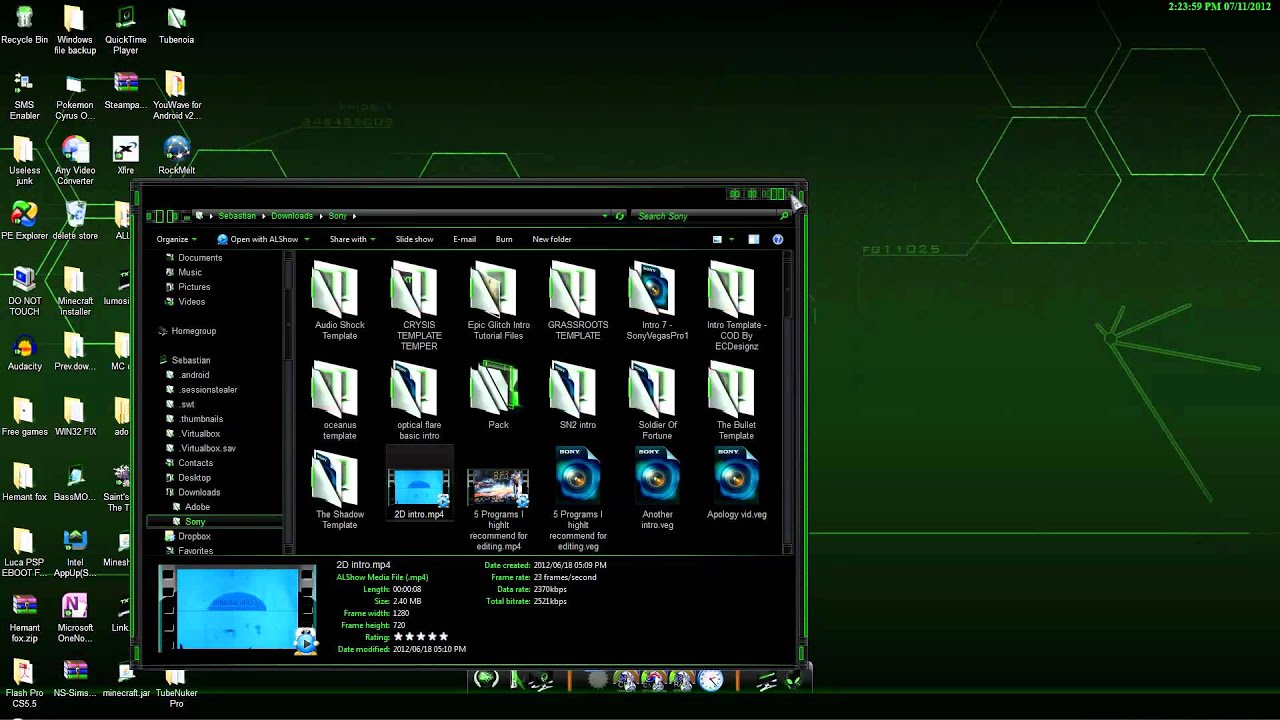
RazerGreen Skin pack free download for Windows 8

RazerGreen skin Pack for Windows 8 (Free Download)

 
Screen Shot


How to Download: 


Download link for Win8 x64

 Here

Download link for Win8 x86
 Here

How to install ?

Just download the required installer for your PC and install it.
Please note that be sure to remove older skin packs before installing this skin pack.


If you have any problem regarding the skin pack just leave a comment below and we will get to you as soon as possible. :)